
DevOps for
Games & Apps
We translate DevOps principles into simple, visual, and automated pipelines built specifically for small studios and indie founders. From compiling Unity builds to syncing database schemas and managing TestFlight reviews, we handle the infrastructure so you can focus on building games and writing code.
What is DevOps?
The bridge between writing code and shipping software.
When you write an app or game, getting it onto a player's phone or server requires a dozen manual steps: compiling code, signing binaries with secure security profiles, uploading files, running tests, and pushing configurations. If you do this by hand, it takes hours and is prone to mistakes.
DevOps replaces this manual friction with automated code. Think of it like a digital assembly line. The moment you push code to GitHub:
Trigger
Your server automatically detects the git push and begins the release loop.
Assemble & Test
Automated builds compile C# or C++ modules, run simulation scripts, and verify performance budgets.
Publish
Signed binaries are submitted to TestFlight, Google Play tracks, and game servers instantly.
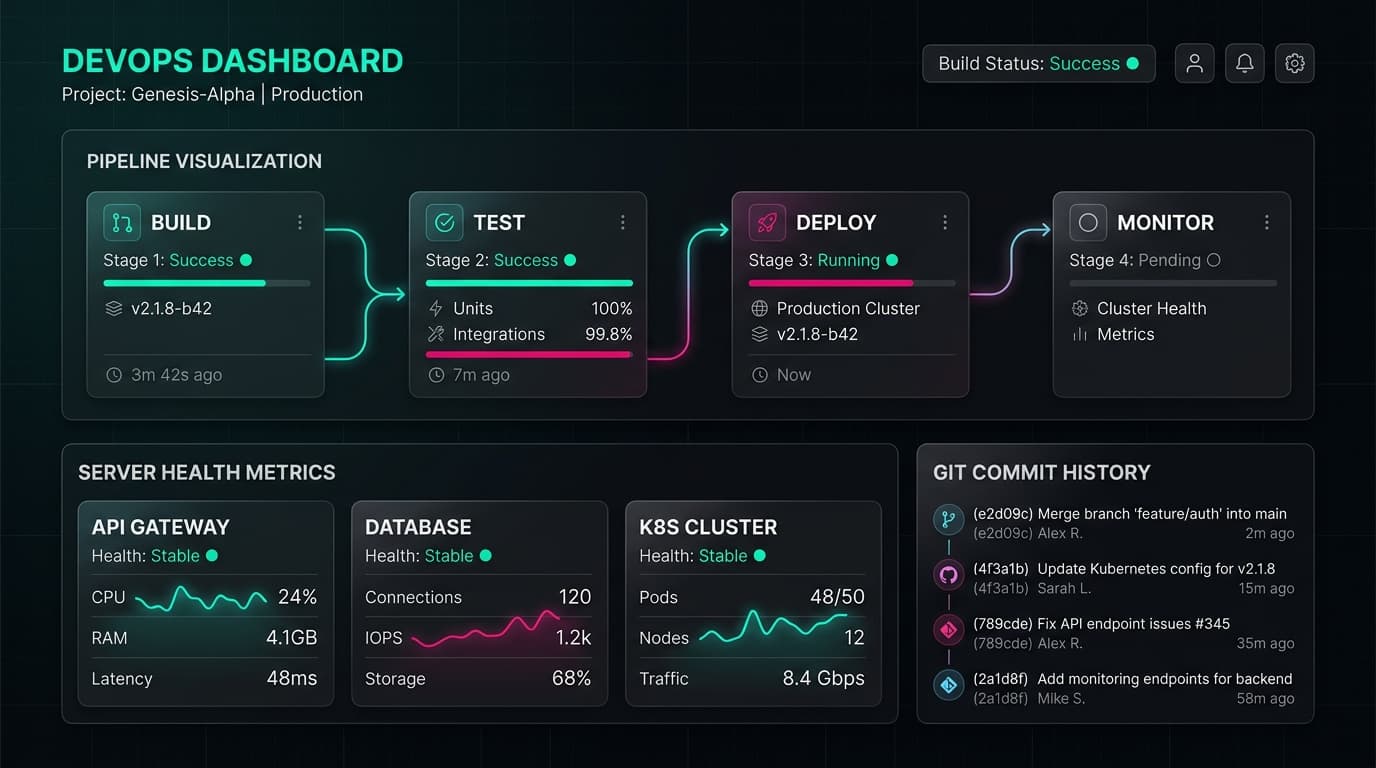
Interactive Infrastructure Topology
React Flow representation of real-time multi-target build & deploy tracks
Pipeline Simulation
Our automated build pipeline in action.
Experience the release cycle of our painterly puzzle game Arrow Bound. Click on any stage to view build logs, memory checks, test targets, and Fastlane submission variables.
Studio Capabilities
Eliminate manual deployment friction.
Here is how we set up the key automated lanes to help a single-developer studio operate with the release speed and stability of a massive team.
Build Generation
Building games or apps manually on a developer's computer takes hours and is prone to errors. We setup cloud servers that compile code automatically. For our 3D JRPG 'darkFrost', whenever code merges, server nodes spin up to compile Unity C# code using IL2CPP, package cooked textures, and output binaries for PC, iOS, and Android.
Automated QA & Testing
Testing mobile games by hand is incredibly tedious. For our puzzle game 'Arrow Bound', we automated QA simulations to verify Sebastian's movement paths and puzzle states. Tests run on real mobile device hardware pools like Firebase Test Lab, catching rendering glitches before updates go live.
Zero-Click Deliveries
Uploading binaries to App Store Connect and Google Play is usually a manual drag-and-drop chore. We write automated scripts that sign app packages, upload builds to TestFlight, configure staged rollout percentages, and sync Addressable asset packs to Amazon CloudFront CDNs.
Infrastructure as Code
We write simple scripts that define your database schemas and server hosting, ensuring your backend is identical across development, staging, and production. For bytheproject.com, our Supabase Postgres schema migrations are tracked in git and roll out automatically on deploy.
Technical Orchestration
Codified Infrastructure.
Rather than writing server setup guidelines in document files, we define all builds, security keys, provisioning rules, and deployment pipelines as code. When updates are pushed, virtual machines spin up, parse our configurations, run tests, and publish releases automatically.
Repeatable builds: Avoid the classic "it compiled fine on my local machine" bugs.
Secure credential vaults: iOS certificates and Android Keystores signed via encrypted variables.
Staged rollouts: Upload updates to internal TestFlight testers before dialling Google Play tracks.
Observability
Real-Time Health Monitoring.
Once updates are pushed, tracking crashes, memory usage, and user latency is critical. We integrate reporting tools like Sentry, Prometheus, and Grafana to watch over your servers and clients, alerting you immediately if error budgets are violated.
[daemon:status] API gateway stable. Latency: 38ms. Build error frequency: <1.2%. Cluster load: 24%. Sentry active.
Framework Configurations
Real setups for real projects.
We don't deal in empty cards. Here's a breakdown of the specific, production-ready DevOps pipeline code, credential structures, and store release setups we deploy for our studio's own mobile games, card games, and web tools.
Unity Engine Setup
We write automated build systems using Unity command-line arguments to compile IL2CPP targets for PC, iOS, and Android. For our 3D JRPG 'darkFrost', we configured automatic Addressable asset compilation: whenever art changes, bundles are compiled and synced to the S3 content CDN without developers needing to run manual exports.
Unreal Engine 5
For our collectible card game 'darkFrost - Stigma', we codified Unreal Automation Tool (UAT) scripts to cook game assets and package cooked pak files. Distributed shader compile caching is synchronized across a fleet of remote workers to cut compile cycles from hours down to minutes.
React & Next.js Web
Our studio site bytheproject.com is powered by React & Next.js. We automate deployments through Git triggers connected directly to Vercel, integrating database migrations on Supabase. Before a deploy is set active, local database checks verify schemas using supabase-cli.
Apple App Store Connect
Deploying our painterly puzzle game 'Arrow Bound' requires heavy integration with Apple. We write Fastlane pipelines that fetch development certificates from secure vault environments, sign binaries, push releases to TestFlight, and notify QA immediately.
Google Play Store
Android builds for 'Arrow Bound' compile as Android App Bundles (.aab) with Keystore signing credentials protected in GitHub secrets. The built binary is pushed directly to Google Play's internal testing track and rolled out automatically.
Cloud & Infrastructure
For backend integrations, we provision cloud infrastructure using Terraform scripts. We configure Agones on top of Kubernetes clusters (EKS/GKE) to scale server nodes dynamically for online matches, maintaining minimal user latency.
Setup Process
Setting up your studio pipeline.
Automating your deployment pipeline follows a cooperative, transparent path. Here is how we configure your setup:
Build Audit & Planning
We review your repository, unity target settings, dependencies, and publishing goals to find build bottlenecks.
Codifying Pipelines
We write Fastlane and GitHub Actions files to compile code, sign binaries, and execute unit test suites.
Cloud Integration
We provision database schemas, S3 content delivery buckets, and server metrics endpoints utilizing Terraform IAC.
Launch & Monitoring
We enable automatic triggers: code merges run tests and upload play-mode binaries to store reviews.
Interactive Dashboard
DevOps Control Center
Explore a fully-operational interactive DevOps control board. Toggle pipeline stages, tweak variables (caching, parallel runners, integration tests), and view live simulated backend alerts.
darkFrost DevOps Control Dashboard
Powering a massive 3D Stylized JRPG developed by a 3-person indie studio (1 Coder, 1 Artist, 1 Designer)
Equivalent to +1.1 developers for free
Crashes & logic loops in production
Interactive Pipeline Sandbox
Click the pipeline cards to inspect/configure, or toggle steps on/off to see direct impact on the studio.
Asset Ingest Pipeline
Stage 1: Ingest & OptimizeWhen outsourcing assets (like beautiful stylized character models, environmental meshes, or full orchestral themes) for a massive game like darkFrost, receiving files from external freelancers is constant. In a manual pipeline, the technical artist has to convert FBX files, manually configure texture compression profiles (Nintendo Switch ASTC, PC DXT, Mobile ASTC), and compress massive WAV music tracks. This burns hours and is highly prone to human error.
Manual Bottleneck (Unity)
Outsourced 3D models and music must be manually checked, downsampled, and optimized for Switch/PC platforms, taking 8-10 hours per week of senior dev time and causing frequent build size bloating.
Automated DevOps Impact
With automated ingest, a Git LFS hook detects new asset commits, passes them to a Unity command-line optimizer, automatically downscales textures depending on target targets, and builds compressed Unity AssetBundles. The artist just uploads, and the machine handles the compression in 2 minutes.
💎 Why This Demystifies Value
Saves your sole artist from repetitive, mind-numbing compression configuration, ensuring darkFrost maintains a crisp 60FPS on Switch while saving gigabytes of build memory.
Configure Parameter & Observe Live Impact
Live Backend & Server Health
Live DevOps Activity Feed
Live Feed* Note: The live activity feeds change instantly as you alter the pipeline configs above. Toggle and inspect options to observe real-time pipeline telemetry shifts!
👾 Case Study: The darkFrost Massive Scale Challenge
Creating a modern stylized 3D JRPG with immersive depth requires thousands of handmade configurations. For a tiny 3-person studio, administrative tasks can swallow up to 60% of daily resources.
Budgeting Outsourced Work (Audio & Graphics)
Our studio outsources darkFrost orchestrations and character designs to freelancers. The Asset Ingest Pipeline automatically screens and formats incoming files instantly on push, stopping high-res bloat and keeping the Switch package slim.
The Switch-to-PC Multiplatform Struggle
Building darkFrost manually on three platforms triggers hours of compiler freezes. The Cloud Build CI takes this load off local laptops, maintaining compilation consistency so the team can keep programming without disruption.
💡 Demystifying DevOps for Non-Tech Stakeholders
To non-technical managers or indie designers, "DevOps" might sound like over-engineering. In reality, DevOps is simply about automating repetitive actions so human brains can spend more time on pure creativity.
Automating Overhead Saves Huge Budgets
With 47 hours saved weekly, our studio gets the equivalent of another full-time coder for free! That is over $80,000/year saved in administrative and bug-fixing resource overhead.
Preventing Community Meltdowns on Launch
Automated test loops lower the bug rate from 42% down to 4%. This keeps players engaged, safeguards early Steam review ratios, and avoids emergency weekend hotfix rushes.
Keep your pipelines green.
Let's automate the packaging, signing, and shipping for your apps and games so your team can focus on mechanics.